What Is Cloud Computing? AWS, Azure and Google Cloud Simply Explained
A simple explanation of cloud computing: how it works, the difference between IaaS, PaaS and SaaS, and how AWS, Microsoft Azure and Google Cloud compare.
Published 6 min read
In this article
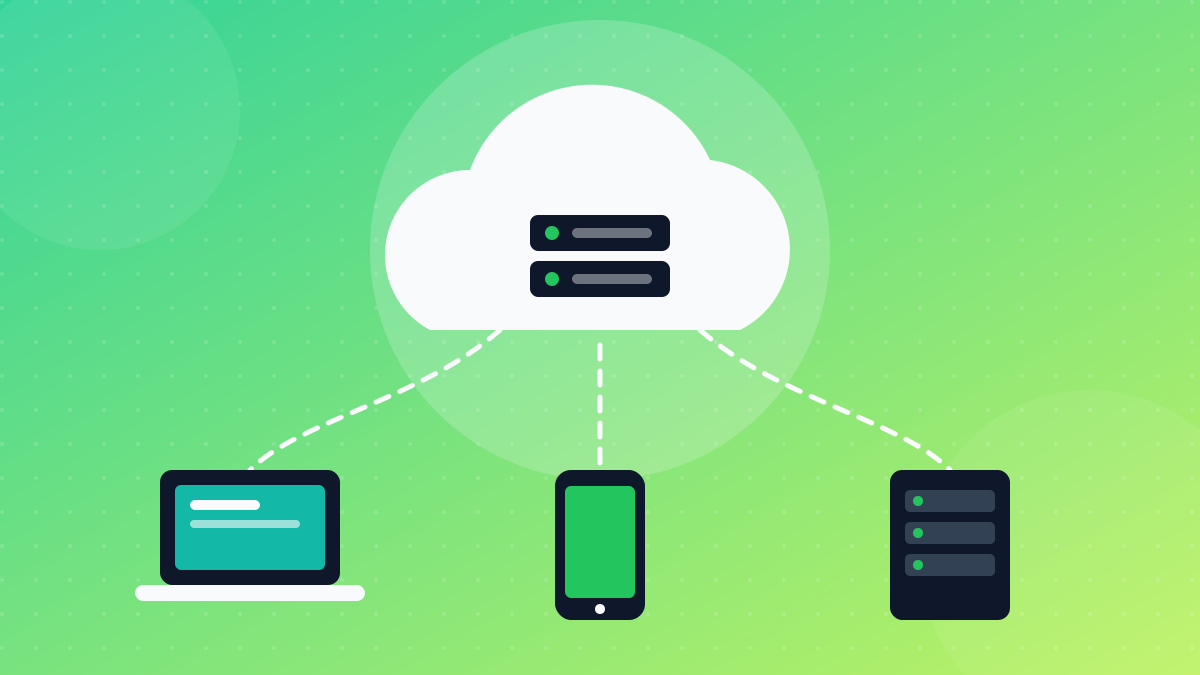
Cloud computing means renting computing resources, such as servers, storage, databases and software, over the internet instead of buying and running your own hardware. You use what you need, when you need it, and usually pay only for what you use. AWS (Amazon Web Services), Microsoft Azure and Google Cloud are the three largest providers.
In short: the cloud is someone else's data centre that you can use on demand. It comes in three main service models (IaaS, PaaS and SaaS), and AWS, Azure and Google Cloud all offer similar core services under different names.
Cloud computing explained with a simple example
Think about electricity. You don't build a power station at home; you plug in and pay for what you use. Cloud computing works the same way for computing power.
Without the cloud, a company launching a website would buy servers, find a room to keep them in, install the operating system, handle cooling and power, and replace broken parts. If traffic suddenly grew, it would need to buy more servers, which takes weeks.
With the cloud, the same company can create a server in minutes from a web console, add more servers when traffic grows, and switch them off when they're no longer needed. You already use the cloud every day: webmail, online document editors, photo backup on your phone and streaming services all run in cloud data centres.
How the cloud works behind the scenes
Cloud providers run huge data centres filled with servers, storage and networking equipment. A few key ideas make it work:
- Virtualisation: one physical server is divided into many virtual machines, so resources can be shared safely between customers.
- Regions: providers group their data centres by geographic region. You choose where your services run, which matters for speed and for data residency rules. All three major providers have regions in the Middle East, and they keep adding more; check each provider's official region map.
- Availability zones: within a region, separate data centre locations let you run copies of your app so that a failure in one place doesn't take everything down.
- Self-service and pay-as-you-go: you create and remove resources yourself, through a web console, command-line tool or API, and you're billed based on usage. If APIs are new to you, see our explanation of what an API is.
IaaS, PaaS and SaaS: the three service models
Cloud services are usually grouped by how much the provider manages for you.
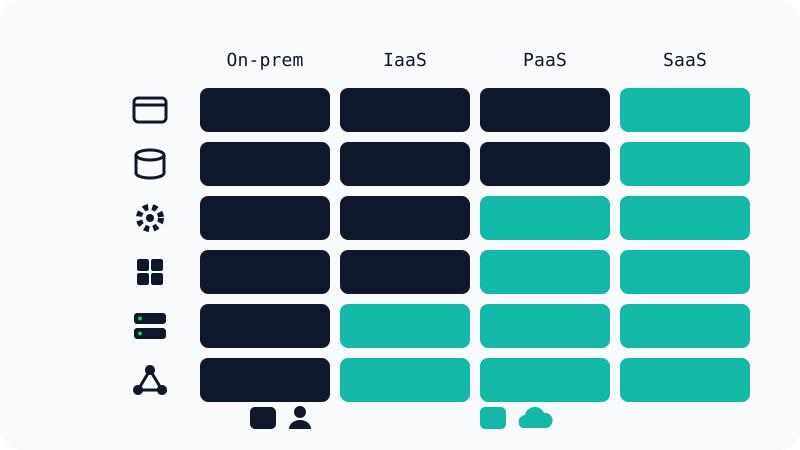
- IaaS (Infrastructure as a Service): you rent virtual machines, storage and networking. You install and manage the operating system and everything above it. Examples: Amazon EC2, Azure Virtual Machines, Google Compute Engine.
- PaaS (Platform as a Service): you upload your code and the platform handles the servers, operating system and runtime. Examples: AWS Elastic Beanstalk, Azure App Service, Google App Engine.
- SaaS (Software as a Service): you simply use finished software in your browser or app. Examples: Gmail, Microsoft 365, Dropbox.
In the diagram below, each row is a layer (from top to bottom: application, data, runtime, operating system, servers and networking). Dark cells are managed by you and teal cells by the cloud provider.
Many modern tools sit between these categories. Container platforms, for example, let you ship your app as a container without managing servers; our Docker for beginners guide explains containers from scratch.
Public, private and hybrid cloud
You'll also hear about different deployment models:
- Public cloud: resources are hosted by a provider like AWS, Azure or Google Cloud and shared across many customers, while each customer's data stays isolated.
- Private cloud: cloud-style infrastructure used by a single organisation, either in its own data centre or hosted for it.
- Hybrid cloud: a mix of both, for example keeping sensitive systems on-premises while running the website in the public cloud.
- Multi-cloud: using services from more than one public cloud provider.
AWS vs Azure vs Google Cloud
The three big providers offer similar building blocks, just with different names:
| AWS | Microsoft Azure | Google Cloud | |
|---|---|---|---|
| Company | Amazon | Microsoft | |
| Virtual servers | Amazon EC2 | Azure Virtual Machines | Compute Engine |
| Object storage | Amazon S3 | Azure Blob Storage | Cloud Storage |
| App platform (PaaS) | Elastic Beanstalk | Azure App Service | App Engine |
| Often chosen for | The widest range of services and a large community | Organisations already using Microsoft products | Data, analytics and Kubernetes |
| Free option for new users | Yes (free tier and/or credits) | Yes (free tier and/or credits) | Yes (free tier and/or credits) |
There's no single "best" provider. Skills transfer well between them, because the core concepts (compute, storage, networking, identity and billing) are the same. Free tiers and credits change often, so check the official pages before relying on them.
Benefits and drawbacks of the cloud
Benefits:
- No large upfront cost: you don't need to buy hardware before you start.
- Scalability: add or remove resources as demand changes.
- Speed: launch servers and services in minutes.
- Reliability: run your app across several locations to survive failures.
- Global reach: serve users from regions close to them.
Drawbacks:
- Unexpected bills: forgetting to switch off a resource, or a sudden spike in traffic, can cost money. Budgets and alerts are essential.
- Complexity: each provider has hundreds of services, which can be overwhelming at first.
- Dependence on the provider: moving from one cloud to another can take effort, especially if you rely on provider-specific services.
- Shared security responsibility: the provider secures the infrastructure, but a misconfigured storage bucket or weak password is still your responsibility.
The cloud also matters for personal data. Keeping copies of important files in cloud storage is part of a good backup plan, as we explain in our guide on how to back up your files properly.
How to start learning cloud computing
If you want to build cloud skills, here's a practical path:
- Learn the basics: what servers, IP addresses, DNS and HTTP are.
- Pick one provider and stick with it at first. AWS, Azure and Google Cloud are all good choices.
- Create a free account and set a budget alert immediately, before creating anything else.
- Build something small: host a static website, create a virtual machine and connect to it, or store files in object storage.
- Delete what you don't need when you finish each experiment.
- Follow the official learning paths. Each provider offers free training and an entry-level certification if you want a structured goal.
Start small, keep an eye on costs, and within a few weeks the main cloud concepts will feel familiar.
Frequently asked questions
Is cloud computing the same as cloud storage?
No. Cloud storage, such as Google Drive or Dropbox, is one type of cloud service. Cloud computing is the wider idea of renting computing resources over the internet, including servers, databases, networking, storage and ready-made software.
Is it safe to put my data in the cloud?
Major cloud providers invest heavily in physical and digital security, often more than a small company could afford. However, security is shared: the provider secures the infrastructure, while you are responsible for strong passwords, access settings and how you configure your services.
Can I try AWS, Azure or Google Cloud for free?
Yes. All three offer free tiers or free credits for new accounts, although the details change and usually require a payment card to sign up. Set up a budget alert straight away so you're warned before any unexpected charges.
Do I need to know programming to learn cloud computing?
Not to start. You can learn the concepts and use the web consoles without coding. As you go further, basic Linux commands, networking knowledge and a scripting language such as Python become very useful.
Which cloud certification should a beginner start with?
Each provider has an entry-level certification: AWS Certified Cloud Practitioner, Microsoft Azure Fundamentals (AZ-900) and Google Cloud Digital Leader. Pick the provider most used by the companies you want to work for.
Related tutorials
Websites & hosting
How to Build Your Own Website from Scratch with No Experience
A beginner's step-by-step guide to building your first website with HTML and CSS, testing it on your computer, and publishing it online for free.
· 5 min read
Websites & hosting
How to Connect Your Domain to Cloudflare Pages (Step by Step)
Connect a Namecheap domain to a Cloudflare Pages site: add the site to Cloudflare, switch nameservers, attach the custom domain and redirect www.
· 6 min read
Websites & hosting
Docker for Beginners: What It Is and How to Use It Step by Step
A beginner-friendly Docker guide: what images and containers are, how to install Docker, the key commands, and how to build your first image.
· 6 min read