Python for Beginners: Install Python and Write Your First Program
A step-by-step Python tutorial for beginners: install Python on Windows or Mac, write and run your first program, and learn variables, conditions and loops.
Published 5 min read
In this article
Python is a free, easy-to-read programming language and one of the best choices for writing your very first program. In this guide you'll install Python, write a small program that asks for your name and greets you, run it from the terminal, and understand every line.
In short: download Python from python.org, check it with python --version, write your code in a file called hello.py, and run it with python hello.py.
Why Python is a good first language
- Readable: Python code looks close to plain English, without lots of braces and semicolons.
- Versatile: it's used for data analysis, AI, automation, back-end development and everyday scripts.
- Huge community: most questions already have answers, and there's a library for almost everything.
- Free and open source, running on Windows, macOS and Linux.
Still deciding? Read which programming language to learn first.
Step 1: Install Python
On Windows
- Go to the official site, python.org, and open the Downloads section.
- Download the latest stable release for Windows.
- Run the installer and follow the steps. If you see an option to add Python to PATH, enable it; this lets you run Python from any folder in the terminal.
On macOS and Linux
- macOS: download the installer from python.org and install it as usual.
- Linux: most distributions come with Python 3 already installed.
Check that it worked
Open a terminal (PowerShell on Windows, Terminal on macOS and Linux) and type:
python --version
On macOS and Linux, use python3 --version. On Windows, py --version also works. If you see a version number, you're ready.
Step 2: Try Python in the terminal
Type python (or python3) and press Enter. You'll see the >>> prompt, which means Python is waiting for your commands. Try:
>>> 2 + 3
5
>>> print("Hello, Taqnio!")
Hello, Taqnio!
This interactive mode is great for testing small ideas quickly. Type exit() to leave.
Step 3: Write your first program
Now let's put a program in a file so you can save it and run it any time.
- Create a new folder called
python-practice. - Open an editor. IDLE comes with Python, or you can use VS Code (see essential VS Code settings and extensions).
- Create a file called
hello.pyin that folder and type:
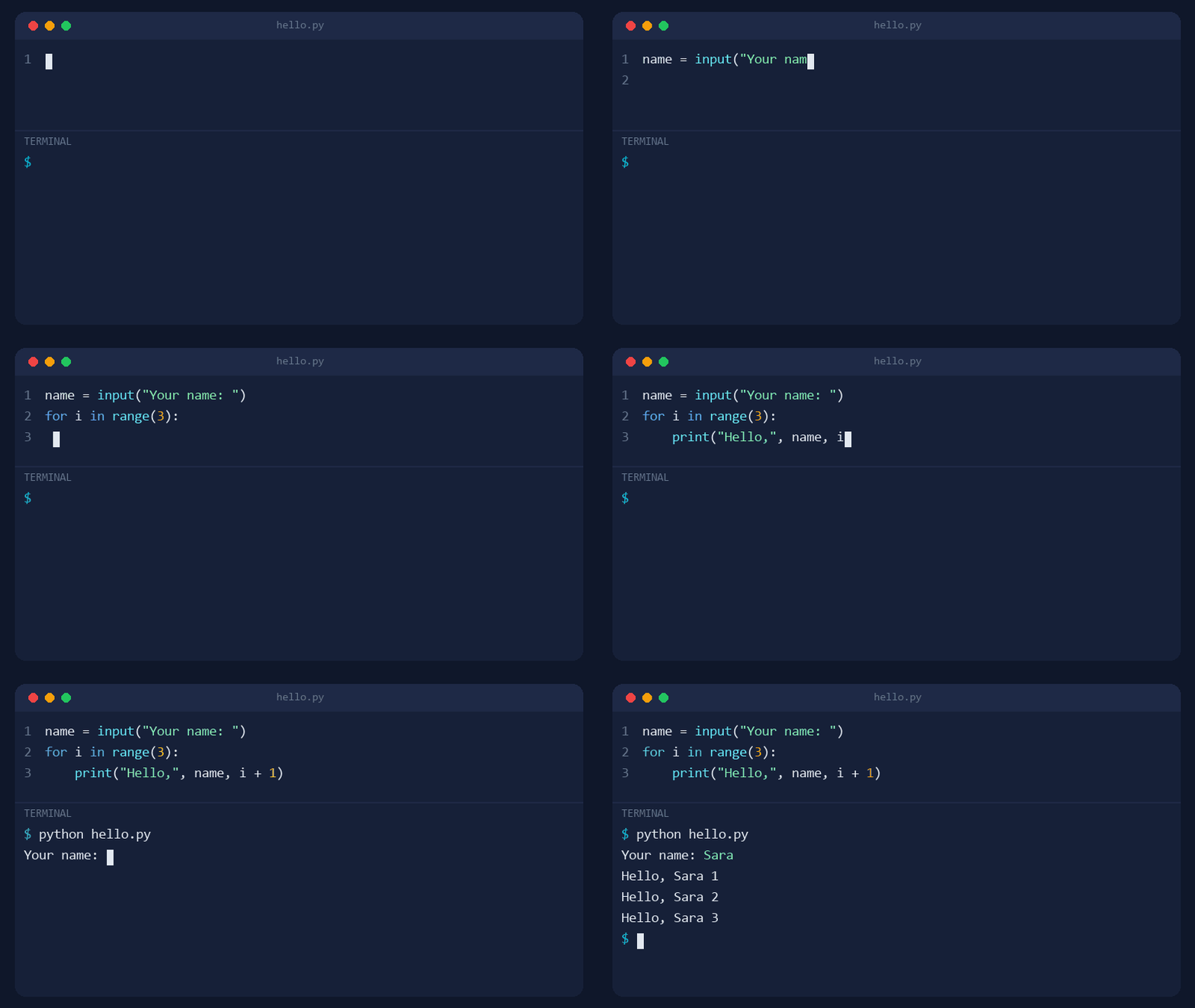
name = input("Your name: ")
for i in range(3):
    print("Hello,", name, i + 1)
- Save the file, open a terminal in the folder and run it:
python hello.py
The program asks for your name. Type it, press Enter, and it prints a greeting three times:
Understanding the program line by line
name = input("Your name: "):inputshows the text in quotes and waits for the user to type something. Whatever they type is stored in a variable calledname.for i in range(3):: this is a loop.range(3)produces the numbers 0, 1 and 2, and the loop runs the indented line once for each.print("Hello,", name, i + 1):printdisplays whatever is inside the brackets. We usei + 1so the count starts at 1 instead of 0.
Notice the indentation (four spaces) before print. In Python, indentation isn't just for looks: it decides which lines belong to the loop.
Try it yourself
The best way to learn is to change the program and watch what happens. Make these edits one at a time, running the program after each:
- Change
range(3)torange(5). How many greetings do you get now? - Use
name.upper()instead ofnameinsideprint. What happened to the name? - Add a line that asks for the user's city, and include the city in the greeting.
- Remove the indentation before
printand run it. Read the error message, then put the spaces back.
Making mistakes here is a good thing. Reading and understanding error messages is a core part of learning to code.
Core concepts to learn next
Variables and data types
name = "Sara"      # text (str)
age = 25           # whole number (int)
height = 1.65      # decimal number (float)
is_student = True  # true/false value (bool)
Conditions
age = int(input("Your age: "))
if age >= 18:
    print("Adult")
else:
    print("Under 18")
input always returns text, so we wrap it in int() to turn it into a number before comparing.
Lists
fruits = ["apple", "banana", "orange"]
for fruit in fruits:
    print(fruit)
A list holds several items in one variable, and the loop visits them one by one.
Functions
A function is a named block of code you write once and reuse whenever you need it:
def greet(name):
    return "Hello, " + name + "!"

print(greet("Sara"))
print(greet("Omar"))
def defines the function and return sets the value it gives back. Functions keep your code shorter and easier to change.
Common beginner errors and how to fix them
| Error | Usual cause | Fix |
|---|---|---|
SyntaxError |
A missing bracket, quote or colon : |
Check the line shown and the one before it |
IndentationError |
Inconsistent indentation | Use four spaces consistently |
NameError |
A misspelled or undefined variable | Check the spelling; capital letters matter |
TypeError |
For example, adding text to a number | Convert with int() or str() |
If your terminal says the python command isn't recognised, Python probably wasn't added to PATH during installation. Run the installer again and choose to modify the install, or try the py command on Windows.
What to learn after your first program
- More on functions: default values and splitting a program into small pieces.
- Dictionaries, to store data as key and value pairs.
- Reading from and writing to files.
- A small project, such as a number guessing game or a to-do list.
For a full plan for the coming months, read how to start learning programming from zero. AI tools can help explain errors, as long as you make sure you understand the fix yourself; see how to use AI to help you code. After that, the best free reference is the official Python Tutorial on python.org.
Frequently asked questions
Is Python free?
Yes. Python is open source and completely free, for learning and for commercial use. Always download it from the official site, python.org.
What's the difference between python and python3?
On Windows the command is usually python or py. On macOS and Linux you'll typically use python3, because python may not exist or may point to a different version. If one doesn't work, try the other.
How long does it take to learn Python basics?
With about an hour a day, many beginners get comfortable with variables, conditions, loops, functions and lists within a few weeks. Building real projects takes longer and comes from steady practice.
Do I need special software to write Python?
No. You can start with IDLE, the simple editor that comes with Python from python.org. As you progress, a code editor like VS Code with the Python extension makes life easier.
Related tutorials
Programming
How to Use AI to Help You Code (A Practical Guide for Beginners)
Learn how to use AI assistants like ChatGPT, Claude and GitHub Copilot to write, explain and debug code, plus the mistakes to avoid when coding with AI.
· 6 min read
Programming
Which Programming Language Should You Learn First?
Python or JavaScript? Find the best first programming language for your goal, whether that's websites, data and AI, mobile apps, or games, and how to start.
· 5 min read
Programming
Frontend vs Backend: What's the Difference?
Frontend is what you see in the browser; backend is the server, logic, and database behind it. Learn the difference, the languages, and which path suits you.
· 5 min read