How to Use AI to Help You Code (A Practical Guide for Beginners)
Learn how to use AI assistants like ChatGPT, Claude and GitHub Copilot to write, explain and debug code, plus the mistakes to avoid when coding with AI.
Published 6 min read
In this article
AI can help you code by explaining code you don't understand, writing first drafts of functions, finding the cause of error messages and generating tests. The key is to treat it like a fast but imperfect teammate: you describe the task clearly, it proposes code, and you review and test everything before you keep it.
In short: give the AI clear context (language, goal, error message), ask for small pieces of code, read and run every suggestion, and never paste secrets into an AI tool.
What AI is actually good at when you code
AI assistants are strongest at tasks that are common and well documented. In practice, they are very useful for:
- Explaining code: paste a function and ask "explain this line by line". Great for reading other people's code.
- Writing boilerplate: forms, simple API calls, config files, regular expressions and repetitive code.
- Debugging: reading an error message and pointing you to the likely cause.
- Writing tests: suggesting unit tests and edge cases you might have missed.
- Translating code: turning a snippet from one language into another, for example JavaScript to Python.
- Learning concepts: asking "what is a closure?" and getting an example at your level.
They are weaker at large design decisions, very new libraries, and anything that depends on details of your project that you haven't shared.
Types of AI coding tools
There are three main kinds of tools. You don't need all of them; start with one.
| Type | Examples | Best for |
|---|---|---|
| Chat assistants | ChatGPT, Claude, Gemini | Explanations, debugging, planning, short snippets |
| Editor assistants | GitHub Copilot and similar extensions | Autocomplete while you type, quick edits inside the file |
| Agent-style tools | Tools that can read your project, edit several files and run commands | Larger changes in an existing project, for more experienced users |
If you're just starting, a chat assistant plus a good editor setup is enough. Our VS Code setup guide shows how to prepare your editor with the right extensions.
How to write a good coding prompt
The quality of the answer depends heavily on the quality of your request. A good coding prompt includes:
- The language and tools: "Python 3", "React", "plain HTML and CSS".
- The goal: what the code should do, in one or two sentences.
- The input and expected output: an example makes a huge difference.
- Constraints: "no external libraries", "keep it beginner friendly", "add comments".
- The relevant code or error: paste only what matters, not your whole project.
Compare these two prompts:
Bad:  make a login page

Good: Write a simple login form in plain HTML and CSS (no frameworks).
      It needs an email field, a password field and a submit button.
      Make it responsive and add short comments explaining each part.
      Don't add any backend code; I only need the front end for now.
The second prompt tells the AI exactly what to build and what to leave out. For more techniques, see our guide on how to write good prompts.
A simple workflow: prompt, code, review, test
Use the same loop for every task, big or small:
- Prompt: describe one small task clearly.
- Code: let the AI propose a solution.
- Review: read the code. If any line is unclear, ask the AI to explain it.
- Test: run it with normal input and with unusual input (empty values, very long text, wrong types).
- Repeat: if something breaks, paste the new error back and continue.
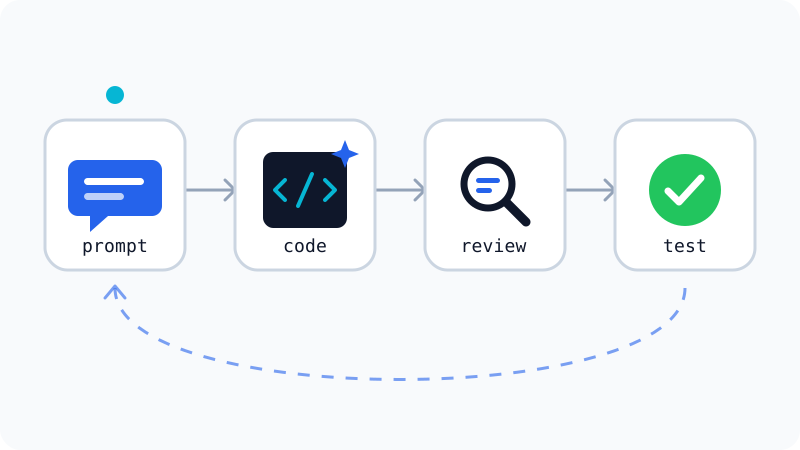
Keep each step small. Asking for "a full online store" in one prompt usually produces long code that is hard to check. Asking for "a function that calculates the cart total" gives you something you can actually verify.
Once the code works, save your progress with version control so you can go back if a later AI suggestion breaks something. Our Git and GitHub guide explains how.
How to debug with AI
Debugging is where AI saves beginners the most time. To get useful help:
- Paste the full error message, including the file name and line number.
- Paste the code around the error, not just the one line.
- Say what you expected and what actually happened.
- Ask for the reason first, then the fix: "Explain why this error happens, then suggest a fix."
For example:
I'm running this Python script and get:
TypeError: can only concatenate str (not "int") to str
on line 4. I expected it to print "You are 25 years old".
Here is the code: ...
Explain the cause first, then show the corrected line.
Asking for the explanation first means you learn something, and you'll recognise the same error next time without help.
Learning to code with AI without becoming dependent
AI can make learning faster, but it can also stop you from learning if it does all the thinking. A few habits help:
- Try first, then ask. Spend a few minutes on a problem before asking the AI.
- Ask for hints, not answers. "Give me a hint, don't write the code" is a useful prompt.
- Retype instead of copy-pasting while you're learning. It forces you to read every line.
- Ask "why?" whenever you don't understand a choice the AI made.
- Build small projects on your own and use AI only when you're stuck.
If you're at the very beginning, follow a structured plan like our guide on how to start learning programming from scratch and use AI as a tutor alongside it.
Mistakes and risks to watch out for
AI-generated code can look confident and still be wrong. Keep these risks in mind:
- Invented functions and packages: AI can suggest a library function or package name that doesn't exist. Check the official documentation, and confirm a package on its official registry (such as npm or PyPI) before you install it.
- Outdated code: models are trained on older data and may suggest old syntax or deprecated features.
- Security problems: watch for things like building SQL queries from raw user input or hard-coded passwords. Ask the AI to "review this code for security issues", but don't rely on that alone.
- Leaking secrets: never paste API keys, passwords, tokens or private customer data into an AI tool.
- Company rules: at work, check which AI tools you are allowed to use with company code.
- Code you can't maintain: if you can't explain what the code does, you'll struggle to fix it later.
AI is a powerful assistant, but you are still the developer. Use it to move faster and learn more, and keep the final decision about every line with you.
Frequently asked questions
Can AI write a complete app for me if I don't know how to code?
It can generate a lot of working code, especially for small projects, but you will struggle to fix bugs, add features or spot security problems if you don't understand what it wrote. Use AI to speed up learning, not to skip it.
Is it safe to paste my code into an AI chat?
Personal practice code is usually fine. Never paste passwords, API keys, customer data or private company code unless your employer explicitly allows that tool. Check the tool's privacy settings to see whether your chats may be used for training.
Why does AI sometimes suggest functions or packages that don't exist?
AI models predict likely-looking code, so they can invent function names, options or package names that sound right. Always check the official documentation and verify a package on its official registry before installing it.
Do I need a paid plan to code with AI?
No. Most chat assistants and several editor tools have free tiers that are enough for learning and small projects. Paid plans usually add higher usage limits and access to stronger models; check each tool's current plans.
Related tutorials
Programming
Which Programming Language Should You Learn First?
Python or JavaScript? Find the best first programming language for your goal, whether that's websites, data and AI, mobile apps, or games, and how to start.
· 5 min read
Programming
Frontend vs Backend: What's the Difference?
Frontend is what you see in the browser; backend is the server, logic, and database behind it. Learn the difference, the languages, and which path suits you.
· 5 min read
Programming
Git and GitHub for Beginners: A Step-by-Step Guide
Learn Git and GitHub from zero: install Git, make your first commit, push your project to GitHub, and use branches safely, with every command explained.
· 6 min read