How to Start a YouTube Channel and Grow It: A Beginner's Guide
Start a YouTube channel the practical way: pick a niche, film with your phone, edit for free, make better thumbnails and learn how channels earn.
Published 7 min read
In this article
To start a YouTube channel you need three things: a Google account, a clear topic, and a phone that records video. Create the channel, publish a first video on a narrow topic, then improve one step at a time using the numbers in YouTube Studio. Growth usually comes from months of consistent uploads, not from one lucky video.
In short: pick a niche you can talk about for a long time, record with your phone in good light with clear sound, edit with a free app, write honest titles with clear thumbnails, publish on a schedule you can keep, and treat money as a long-term result, not a promise.
Choose a niche you can keep talking about
A niche is the topic and audience your channel serves. A clear niche tells viewers why to subscribe and helps YouTube show your videos to the right people.
Ask yourself three questions:
- What do I know or enjoy enough to learn about for years? Cooking, tech tips, study skills, gaming, a craft, a language.
- Who exactly is it for? "Cooking" is broad. "Quick, cheap meals for university students" is a channel people can picture.
- Can I list 30 video ideas right now? If you get stuck at 10, the topic may be too narrow or not exciting enough for you.
Start narrow and widen later. A focused channel is much easier to grow than a channel about everything.
Create your channel the right way
- Sign in to youtube.com with your Google account.
- Open your profile menu and choose the option to create a channel.
- Pick a name that is short, easy to spell and not tied to a single video.
- Add a profile picture and a banner. A free design tool such as Canva is enough.
- Write a short channel description: who the channel is for, what they will learn or enjoy, and how often you upload.
Some features, such as custom thumbnails and longer uploads, may require you to verify your account (usually with a phone number). YouTube Studio will tell you if a feature needs verification.
Your channel will become valuable over time, so protect it: use a strong password and turn on two-factor authentication for your Google account.
Equipment: your phone is enough to start
You don't need a professional camera; modern phones record good video. Beginners usually struggle with sound and light, not the camera.
| Item | Start with | Upgrade later (optional) |
|---|---|---|
| Camera | Your phone's rear camera | A better phone or a used camera |
| Sound | A quiet room, phone close to you, or wired earphones with a mic | A clip-on (lavalier) microphone |
| Light | Face a window in daylight | A small LED panel or softbox |
| Stability | A stack of books or a cheap phone tripod | A sturdier tripod |
A few quick tips:
- Sound matters more than picture. People will watch a slightly soft video, but they leave quickly if they can't hear you well.
- Clean the lens before recording. It's a simple fix for blurry footage.
- Record horizontally for normal videos and vertically for Shorts.
- Do a 10-second test and listen back before recording the full video.
Only buy gear when a specific problem keeps annoying you, like echo in your room.
Free tools to edit your videos
Several solid editors are free:
- On your phone: CapCut is popular and easy to learn (availability can depend on your country). iPhone users also have iMovie.
- On a computer: DaVinci Resolve has a powerful free version but needs a reasonably strong computer. Shotcut is free and open source. Clipchamp comes with recent versions of Windows, and iMovie is free on Mac.
A simple editing routine for beginners:
- Cut long pauses, mistakes and repeated sentences.
- Make the first seconds count: show or say what the viewer will get.
- Add captions. YouTube can generate automatic captions for many languages, and you can correct them in YouTube Studio.
- Use background music only if it helps, and take it from the free Audio Library in YouTube Studio so you don't run into copyright problems.
Titles and thumbnails that earn honest clicks
Your title and thumbnail decide whether people click at all. Aim for clear, not clickbait.
Titles:
- Say exactly what the video delivers, for example: "How to Make Bread Without an Oven".
- Use the words people would type into search.
- Put the most important words first, because long titles get cut off on phones.
Thumbnails:
- Use a 16:9 image; 1280x720 pixels is the common recommended size.
- One clear subject, strong contrast, and very few words (if any) that are readable on a small phone screen.
- Check your thumbnail at a tiny size before uploading. If you can't tell what it is, simplify it.
Don't promise something the video doesn't deliver. Viewers who feel tricked leave quickly, and that tells YouTube the video didn't satisfy them. You can also add timestamps in your description, starting with 0:00, to split long videos into chapters that are easier to navigate.
Consistency beats perfection
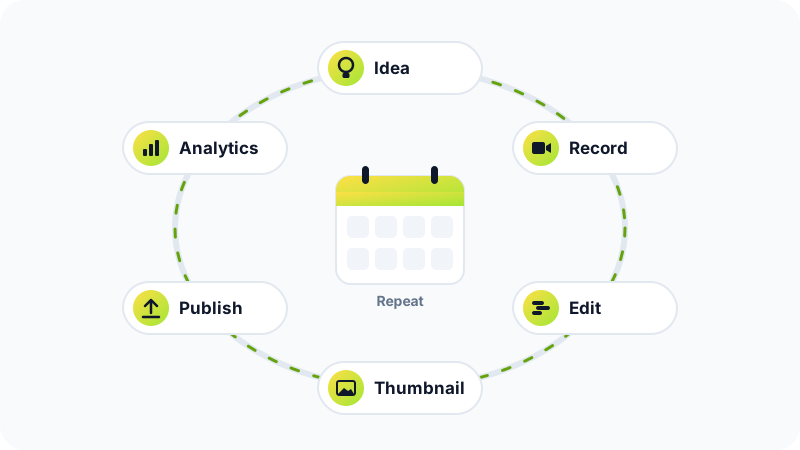
The channels that grow are usually the ones that keep publishing and improving, not the ones with the perfect first video.
- Pick a schedule you can actually keep, such as one video a week or one every two weeks. A calm, steady pace beats a burst followed by months of silence.
- Batch your work: plan several ideas at once, then film two or three videos in one session.
- Read your analytics in YouTube Studio after each upload. Two things matter most at the start: how often people click after seeing your thumbnail, and how long they keep watching.
- Reply to comments in the first days after publishing. Your early viewers often give you your next video ideas.
AI assistants can help you brainstorm ideas and outline scripts; our guide on how to write good prompts shows how to ask for useful results. Just make sure the final video sounds like you.
How YouTube channels make money
Be realistic here: income varies enormously between channels, and many channels earn little or nothing for a long time. These are the main options:
- YouTube Partner Program (YPP): lets eligible creators earn a share of ad revenue and use features such as channel memberships and viewer tips. The eligibility requirements (such as subscriber and watch-time or Shorts-view thresholds) are published by YouTube, differ by feature and region, and change over time, so check YouTube's official help pages for the current rules. You also have to follow YouTube's monetisation policies.
- Sponsorships: brands pay you to mention or review a product. You must disclose paid promotions, both in YouTube's settings and under the rules in many countries.
- Your own products: templates, guides, courses or presets that your audience asks for. See our guide on how to sell digital products online.
- Services: a good channel works as a portfolio. Editors, designers and teachers often get clients through their videos. Our guide on starting freelancing from zero can help.
Common mistakes to avoid
- Buying subscribers or views. It breaks YouTube's rules on fake engagement and can get videos removed or your channel penalised.
- Using other people's content without permission. Repeated copyright strikes can lead to the channel being terminated.
- Changing topic every week. Your audience subscribed for something specific.
- Giving up after ten videos. Early videos are practice for everyone.
- Spending on gear before learning the basics. Good sound and a clear idea do more than an expensive camera.
Your first week plan
- Day 1: choose your niche and write 30 video ideas.
- Day 2: create and set up the channel.
- Day 3: script or outline your first video.
- Day 4: record it with your phone.
- Day 5: edit it and make a thumbnail.
- Day 6: publish, then reply to any comments.
- Day 7: look at the numbers, note one thing to improve, and plan video two.
Then repeat, keep your expectations realistic, and let the results build over months.
Frequently asked questions
Do I have to show my face on YouTube?
No. Many successful channels use screen recordings, voice-over, hands-only shots or simple animation. What matters more is useful content and clear, easy-to-hear audio.
How long does it take to earn money from a YouTube channel?
There is no fixed timeline. Many channels need many months or years of regular uploads before they earn anything, and many never do. Treat it as a long-term project and keep your main source of income.
Can I use music or clips I found online in my videos?
Usually not, unless you own them or have permission or a licence. Copyrighted material can lead to copyright claims or strikes on your channel. Use the free Audio Library inside YouTube Studio or material you created yourself.
Should I make Shorts or long videos?
Both can work. Shorts can help new viewers discover you, while longer videos let you explain a topic properly and build a loyal audience. Try both for a while and let your analytics show you what your viewers prefer.
Related tutorials
Earning online
AI Skills Freelancers Can Sell: 6 Services and How to Deliver Them Well
Six AI-assisted services freelancers can offer, from writing and images to chatbots and automation, plus how to be honest with clients and check quality.
· 6 min read
Earning online
How to Spot 'Make Money Online' Scams and Protect Yourself
Learn the warning signs of online money scams, from upfront fees and guaranteed returns to fake jobs and task apps, and how to check offers and report fraud.
· 6 min read

Earning online
How to Start Freelancing From Zero: A Practical Beginner's Guide
Start freelancing with no experience: pick a skill, build a small portfolio, use platforms like Upwork, Fiverr or Mostaql, set your prices and get paid safely.
· 7 min read